javascript
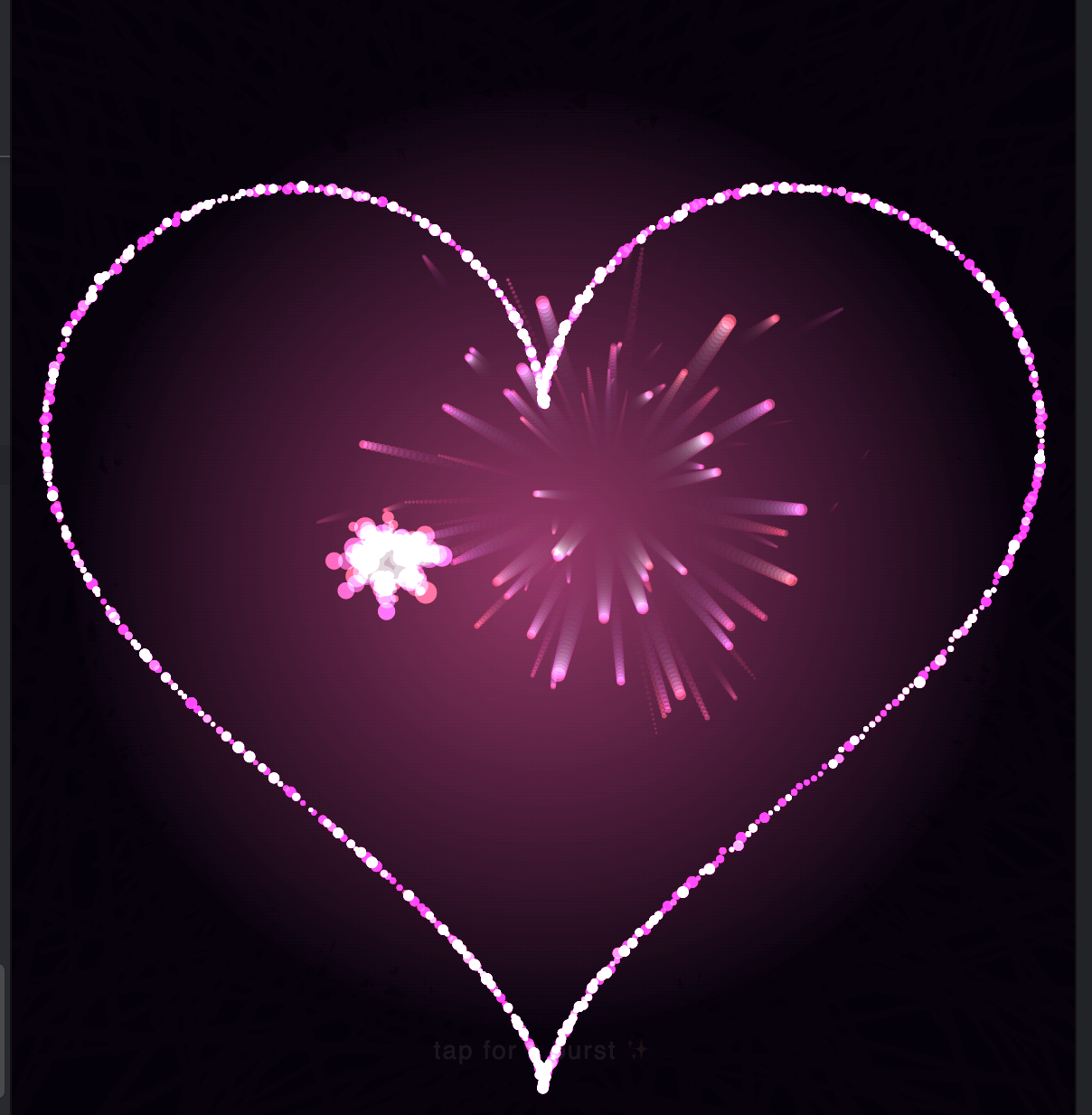
Amazing JavaScript - Heart Animation
Heart Animation is a captivating coding project that brings a vibrant heart to life with smooth, rhythmic beats.This animation showcases the power of JavaScript to create visually stunning effects.
amazing-javascript-heart-animation.javascript
1<!DOCTYPE html>
2<html lang="en">
3<head>
4    <meta charset="UTF-8">
5    <title>Particle Heart</title>
6    <style>
7        html, body {
8            margin: 0;
9            padding: 0;
10            width: 100%;
11            height: 100%;
12            background: #05010a;
13            overflow: hidden;
14        }
15        canvas {
16            display: block;
17        }
18        #tap-hint {
19            position: absolute;
20            bottom: 30px;
21            width: 100%;
22            text-align: center;
23            color: rgba(255,255,255,0.35);
24            font-family: -apple-system, "Segoe UI", sans-serif;
25            font-size: 14px;
26            letter-spacing: 1px;
27            pointer-events: none;
28            animation: fade 3s ease-in-out infinite;
29        }
30        @keyframes fade {
31            0%, 100% { opacity: 0.15; }
32            50% { opacity: 0.5; }
33        }
34    </style>
35</head>
36<body>
37<canvas id="c"></canvas>
38<div id="tap-hint">tap for a burst ✨</div>
39<script>
40    const canvas = document.getElementById('c');
41    const ctx = canvas.getContext('2d');
42    let W, H, DPR;
43
44    function resize() {
45        DPR = Math.min(window.devicePixelRatio || 1, 2);
46        W = window.innerWidth;
47        H = window.innerHeight;
48        canvas.width = W * DPR;
49        canvas.height = H * DPR;
50        canvas.style.width = W + 'px';
51        canvas.style.height = H + 'px';
52        ctx.setTransform(DPR, 0, 0, DPR, 0, 0);
53    }
54    resize();
55    window.addEventListener('resize', resize);
56
57    // ---- Heart curve sampling ----
58    function heartPoint(t) {
59        // classic parametric heart, t in [0, 2*PI]
60        const x = 16 * Math.pow(Math.sin(t), 3);
61        const y = -(13 * Math.cos(t) - 5 * Math.cos(2 * t) - 2 * Math.cos(3 * t) - Math.cos(4 * t));
62        return { x, y };
63    }
64
65    function makeParticles(count, scale, cx, cy) {
66        const pts = [];
67        for (let i = 0; i < count; i++) {
68            const t = (i / count) * Math.PI * 2;
69            const base = heartPoint(t);
70            pts.push({
71                // target position on the heart outline
72                tx: cx + base.x * scale,
73                ty: cy + base.y * scale,
74                // current position starts scattered
75                x: cx + (Math.random() - 0.5) * W * 1.4,
76                y: cy + (Math.random() - 0.5) * H * 1.4,
77                // slight per-particle jitter offset so heart looks alive, not rigid
78                jitterA: Math.random() * Math.PI * 2,
79                jitterSpeed: 0.5 + Math.random() * 1.2,
80                jitterAmp: 2 + Math.random() * 6,
81                size: Math.random() * 2 + 1.2,
82                hueShift: Math.random() * 20 - 10,
83                settleSpeed: 0.03 + Math.random() * 0.03,
84                vx: 0,
85                vy: 0
86            });
87        }
88        return pts;
89    }
90
91    let particles = [];
92    let bursts = []; // temporary burst particles
93
94    function initHeart() {
95        const cx = W / 2;
96        const cy = H / 2;
97        const scale = Math.min(W, H) / 34;
98        const count = Math.floor((W * H) / 1400);
99        particles = makeParticles(Math.max(600, Math.min(count, 2600)), scale, cx, cy);
100    }
101    initHeart();
102
103    function addBurst(x, y) {
104        const n = 60;
105        for (let i = 0; i < n; i++) {
106            const angle = Math.random() * Math.PI * 2;
107            const speed = 2 + Math.random() * 6;
108            bursts.push({
109                x, y,
110                vx: Math.cos(angle) * speed,
111                vy: Math.sin(angle) * speed,
112                life: 1,
113                decay: 0.012 + Math.random() * 0.02,
114                size: Math.random() * 2.5 + 1,
115                hue: 320 + Math.random() * 40
116            });
117        }
118    }
119
120    canvas.addEventListener('click', (e) => addBurst(e.clientX, e.clientY));
121    canvas.addEventListener('touchstart', (e) => {
122        for (const t of e.touches) addBurst(t.clientX, t.clientY);
123    }, { passive: true });
124
125    let frame = 0;
126    let pulsePhase = 0;
127
128    function draw() {
129        frame++;
130        pulsePhase += 0.045;
131
132        // trailing fade — soft glow trails behind particles
133        ctx.fillStyle = 'rgba(5, 1, 10, 0.18)';
134        ctx.fillRect(0, 0, W, H);
135
136        const pulse = 1 + Math.sin(pulsePhase) * 0.035;
137        const cx = W / 2;
138        const cy = H / 2;
139
140        ctx.globalCompositeOperation = 'lighter';
141
142        for (const p of particles) {
143            // ease toward target heart position
144            const dx = (p.tx - cx) * pulse + cx - p.x;
145            const dy = (p.ty - cy) * pulse + cy - p.y;
146            p.vx += dx * p.settleSpeed * 0.02;
147            p.vy += dy * p.settleSpeed * 0.02;
148            p.vx *= 0.86;
149            p.vy *= 0.86;
150            p.x += p.vx;
151            p.y += p.vy;
152
153            // gentle floating jitter once settled
154            const j = Math.sin(frame * 0.02 * p.jitterSpeed + p.jitterA) * p.jitterAmp * 0.15;
155
156            const hue = 330 + p.hueShift + Math.sin(frame * 0.01 + p.jitterA) * 8;
157            const light = 55 + Math.sin(frame * 0.03 + p.jitterA) * 15;
158
159            ctx.beginPath();
160            ctx.fillStyle = `hsla(${hue}, 90%, ${light}%, 0.85)`;
161            ctx.arc(p.x + j, p.y + j, p.size, 0, Math.PI * 2);
162            ctx.fill();
163        }
164
165        // burst particles
166        for (let i = bursts.length - 1; i >= 0; i--) {
167            const b = bursts[i];
168            b.x += b.vx;
169            b.y += b.vy;
170            b.vx *= 0.96;
171            b.vy *= 0.96;
172            b.life -= b.decay;
173            if (b.life <= 0) {
174                bursts.splice(i, 1);
175                continue;
176            }
177            ctx.beginPath();
178            ctx.fillStyle = `hsla(${b.hue}, 95%, 65%, ${b.life})`;
179            ctx.arc(b.x, b.y, b.size * b.life * 2, 0, Math.PI * 2);
180            ctx.fill();
181        }
182
183        // soft central glow
184        const grad = ctx.createRadialGradient(cx, cy, 0, cx, cy, Math.min(W, H) * 0.45);
185        grad.addColorStop(0, 'rgba(255, 90, 160, 0.10)');
186        grad.addColorStop(1, 'rgba(255, 90, 160, 0)');
187        ctx.fillStyle = grad;
188        ctx.fillRect(0, 0, W, H);
189
190        ctx.globalCompositeOperation = 'source-over';
191
192        requestAnimationFrame(draw);
193    }
194
195    // initial black fill so trail effect starts clean
196    ctx.fillStyle = '#05010a';
197    ctx.fillRect(0, 0, W, H);
198
199    // auto-bursts occasionally for extra sparkle, TikTok-style
200    setInterval(() => {
201        const cx = W / 2 + (Math.random() - 0.5) * W * 0.3;
202        const cy = H / 2 + (Math.random() - 0.5) * H * 0.3;
203        addBurst(cx, cy);
204    }, 1800);
205
206    draw();
207</script>
208</body>
209</html>
Ready to Level Up?
Start with the foundations and build toward production. Find the right learning path for your goals.
Grab Your Free Roadmap